
How to sell tickets for your event in Malta
Step-by-step guide for Maltese event organisers. From choosing a platform to scanning attendees at the door, with a focus on integrated ticketing and CRM.
6 min read
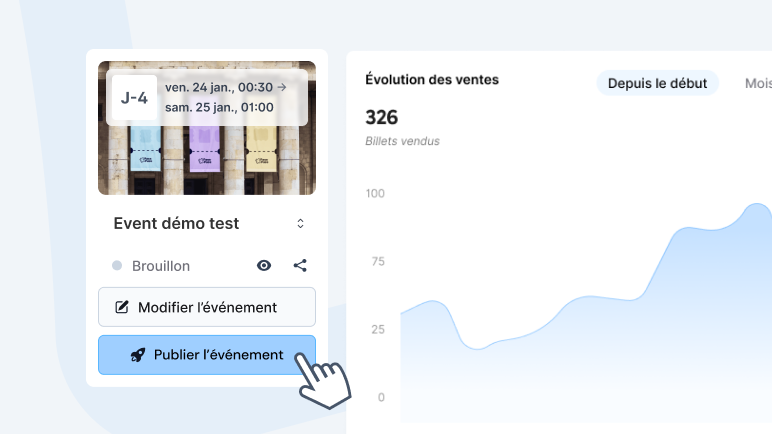
You have a venue, a date and a programme. Now you need people to register, pay and show up. This guide covers the full process for Maltese event organisers, from setting up your first ticket to printing badges at the door. The focus is on platforms that combine ticket sales with attendee management, so you are not juggling five tools to run one event.
Choose a platform that collects more than payments
Most ticketing platforms focus on the transaction. Ticket sold, money received, done. But if you are running a professional event, a conference, a trade show or a corporate gathering, you need more. You need to know who is coming, what their role is, which sessions they signed up for, whether they need parking, and what they eat.
That data should flow into your attendee management system without any manual export. Look for a platform that lets you add custom registration fields beyond name and email. Job title, company, phone number, meal preference, accessibility needs. Each field becomes a data point you can use for segmentation, communication and on-site logistics.
This is what separates a ticketing tool from an event CRM. The ticketing tool sells a ticket. The event CRM knows who bought it, can reach them before the event, and uses their data to personalise the on-site experience.
What to look for in an event platform
- Modern and intuitive interface – create your event and start selling tickets in minutes. No training required, no mandatory sales calls before you can get started.
- Secure payment processing – Visa, Mastercard, Apple Pay, Google Pay, Klarna. PCI DSS compliant. Instant confirmation with PDF ticket and Wallet.
- Interactive seating plan – for theatres, shows, concerts and galas, attendees choose their own seats on desktop or mobile, with prices by section. Set up with the PassPass team from your existing venue plan.
- Transparent pricing with no subscription – pay only when you sell. No monthly fees, no setup costs. Calculate your profitability before your first ticket goes on sale.
- Website widget integration – embed ticket sales on your own site. Your visitors stay in your brand experience. API and Webhook available for custom setups.
- White label and full customisation – branded checkout, personalised tickets and emails, custom sending domain. Your event, your brand, from start to finish.
- Responsive customer support – real people who understand event logistics. Available before, during, and after your event.
- On-site badge printing – scan the QR code, print a personalised badge in three seconds. Name, company, role, colour-coded by ticket type.
- Automatic invoicing – when an attendee requests an invoice at checkout, it is generated automatically in your name, with no invoices to create by hand. Essential for B2B events and corporate registrations.
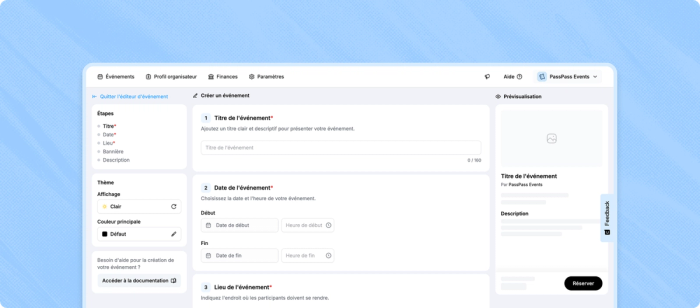
Set up your event and ticket types
Start with the basics. Event title, date, time, venue address and a description that tells potential attendees what to expect. Upload a cover image that works on both desktop and mobile. Then configure your ticket types. Early bird, standard, VIP, speaker, exhibitor, group rates. Each ticket type can carry different pricing and different registration fields.
A VIP ticket might ask for company name, job title and badge name. A general admission ticket might only need a name and email. A speaker ticket might collect a bio and headshot. On a platform with integrated CRM, the ticket type becomes a natural segmentation layer. You can later email all VIP holders separately, generate a list of all speakers, or export all exhibitors with their stand requirements.
Accept payments in euros
Malta uses the euro. Make sure your platform supports EUR payments through Stripe or a similar PCI-compliant processor. The payment methods that matter for Maltese audiences are Visa, Mastercard, Apple Pay and Google Pay. Some platforms also support Klarna for flexible payment options on higher-priced tickets.
Check the fee structure carefully. Some platforms charge a percentage plus a fixed fee per ticket. Others charge a flat monthly rate or a per-ticket fee with no percentage. For most Maltese events under 2,000 attendees, a per-ticket model with no subscription is the most cost-effective option. You pay only when you sell.
Embed ticket sales on your website
A sales widget embedded on your own website keeps visitors in your brand experience. They select tickets, fill in their details and pay without being redirected to a third-party domain. The registration data still flows into your attendee management system. Look for platforms that offer a JavaScript widget or iframe integration that matches your website's colours and fonts. This is especially important for corporate events where brand consistency matters.
Try the checkout experience with your branding
Enter your website URL. The widget generates a preview of the checkout experience with your colours and style.
Test the registration flow live
Analyse your site to match your colours and styles in the demo.
Communicate with attendees before the event
Once tickets are sold, the communication begins. Practical updates, schedule changes, parking info, session reminders, pre-event surveys. If your ticketing platform includes integrated email tools, you can do this without exporting contacts to a separate mailing tool. Filter by ticket type, send targeted messages, track opens and clicks. The attendee list and the communication tool share the same data, so every email reaches the right segment.
This is where integrated CRM pays off. A conference organiser can email speakers their AV setup form, send exhibitors their stand allocation, and remind all attendees about the networking dinner, all from the same dashboard without touching a spreadsheet.
Manage check-in and badges on the day
Each ticket carries a QR code. At the venue entrance, scan it with a smartphone or tablet. The system confirms the ticket is valid, checks it has not been used before, and marks the attendee as arrived. Your real-time dashboard shows how many people have checked in, broken down by ticket type.
If your platform supports badge printing, the scan triggers a printed badge with the attendee's name, company and role, pulled directly from the registration data. No separate badge software, no pre-printed lists that are out of date by event day, no handwritten name tags. One scan, one badge, three seconds. The badge design matches your event branding, with colour coding by ticket type for easy identification.
Use the data after the event
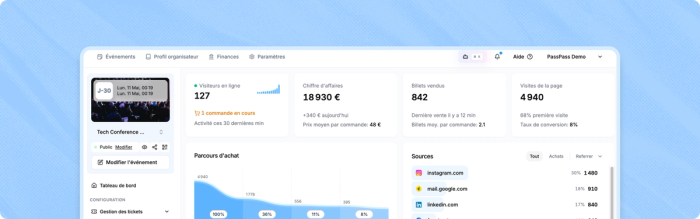
After the event, you have a complete record of who registered, who actually attended, when they arrived and which ticket type they held. On a platform with integrated CRM, that data is already structured and ready for follow-up. Send a thank-you email to everyone who attended. Share session recordings with specific ticket holders. Survey attendees on their experience. Invite them to your next event with a returning-attendee discount.
The compounding effect is real. Each event builds your attendee database. Over time, you know your audience better, your communication gets more targeted, and your events sell out faster because you are reaching people who already know and trust your events.
A solution for every type of event
Pro and B2B – Professional events (registration, invoicing, on-site badges), Seminars and conferences (forms, name badges, QR check-in), Trade shows (visitor management, arrival badges), Corporate events (B2B invoicing).
Entertainment – Festivals (multi-day passes, presales), Concerts (sale waves, UTM tracking), Nightlife (presales, VIP), Sports events.
Community – Cultural events (multi-date, reduced rates), Nonprofits and NGOs (free for non-ticketed events).
Discuss your needs with the PassPass team
Frequently asked questions
On most platforms, you can have your event live and selling tickets within 15 to 30 minutes. Creating an account, adding event details, configuring ticket types and customising your page. If you add custom registration fields and branding, allow an additional 15 minutes. On PassPass, your free account takes 30 seconds and your ticketing can be up and running in under 5 minutes.
Yes. Most platforms offer an embeddable widget or iframe that you can add to your website. Visitors buy tickets directly on your site without being redirected. The data flows into your attendee management system the same way as direct sales.
On most platforms, badge printing requires a third-party tool or manual preparation. PassPass offers integrated badge printing as an add-on, where the QR scan at check-in triggers a personalised badge using the registration data. No separate software needed.
An event CRM (Customer Relationship Management) is a system that manages your attendee data beyond the ticket transaction. It includes custom registration fields, attendee segmentation by profile or ticket type, integrated email communication, and post-event analytics. Some ticketing platforms include CRM features natively; others require you to connect external tools.
PassPass accepts Visa, Mastercard, American Express, Apple Pay, Google Pay, and Klarna. All payments are processed in euros and are PCI DSS compliant.
Yes. PassPass lets you customise the entire checkout experience. Embedded widget on your site, branded checkout, personalised tickets and emails, custom sending domain. Colour and layout customisation is included in standard pricing.
Yes. PassPass is completely free for events without paid ticket sales. You get all platform features including custom registration fields, attendee segmentation, email communication and QR check-in at no cost. On-site badge printing is available as an add-on.