
Selling reserved seats online: a guide to seating plan ticketing
How seating plan ticketing works, what it changes for your audience and for you, and which features to check before you start selling reserved seats online.
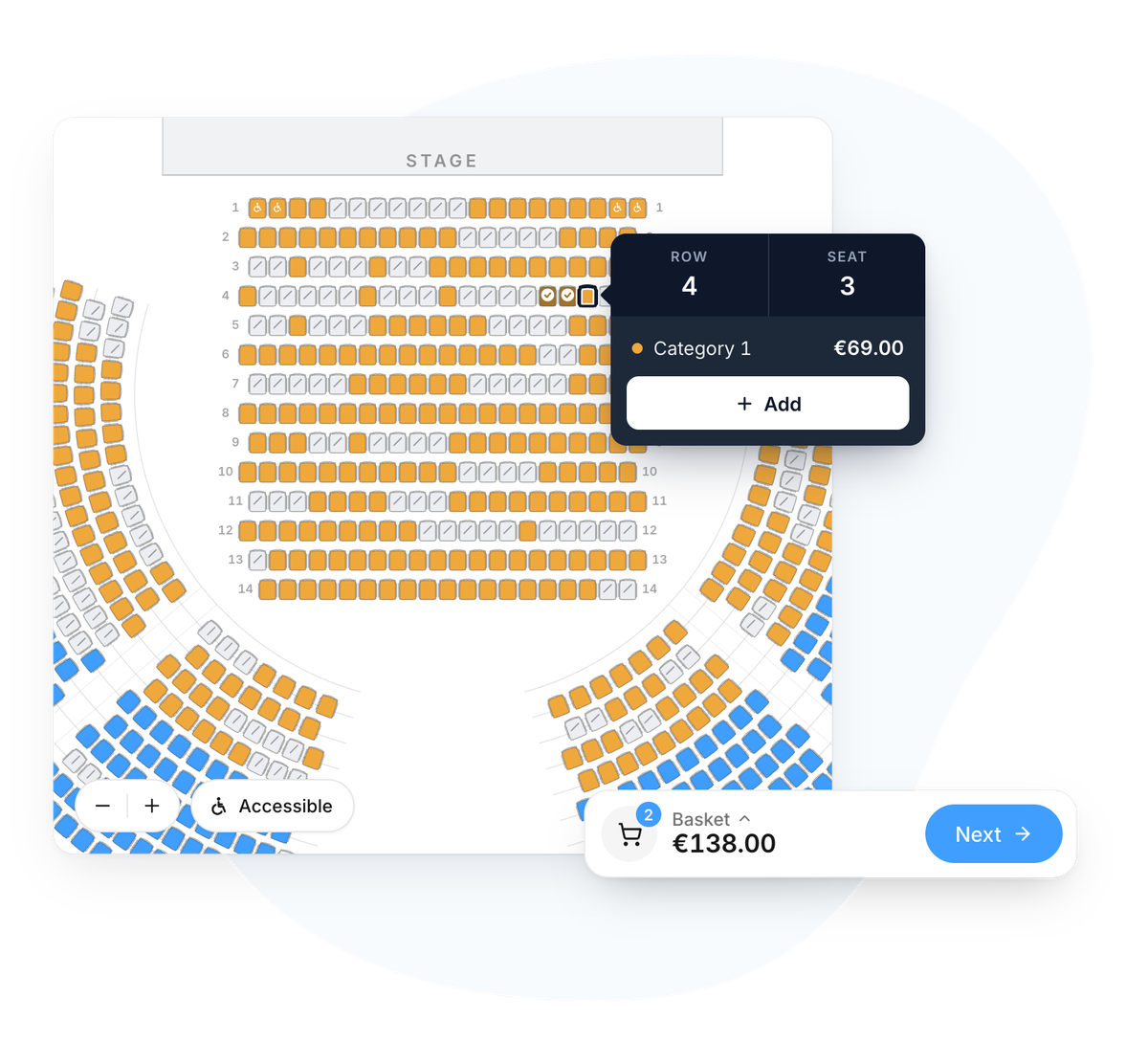
To sell reserved seats online, you need ticketing with an interactive seating plan. Your venue is recreated on screen, every seat has a row, a number and a price, and buyers pick their own seat before paying. While they complete their order, the seat is held for them, so no one else can buy it. They know exactly where they will be sitting.
This guide is for organisers of shows, concerts and galas, and for cultural venues that want to start selling allocated seats online, or simply understand what a seating plan can do for them.
What is seating plan ticketing?
Standard ticketing sells quantities: 200 adult tickets, 50 concessions. Seating plan ticketing sells specific seats. Buyers see the venue, the stage, the rows and the seats still available, then choose the ones they want.
With reserved (or allocated) seating, each ticket matches a specific seat. With general admission, people sit or stand wherever they like when they arrive. Both have their merits, which we cover in our article on reserved seating vs general admission. A single plan can also combine the two, for example numbered tiers and a standing pit.
The plan is more than a picture: it is connected to your sales. Each seat sold disappears from the plan for other buyers in real time, so the same seat is never sold twice.
What a seating plan changes for your audience
For a seated event, people want to know where they will sit, how far they will be from the stage and who they will be next to. A good seating plan lets them:
- see the price of every seat on the plan, with a colour for each section;
- sit with friends and family by choosing seats side by side;
- choose a price for each seat (full price, concession, child) in the basket;
- find a suitable seat if they use a wheelchair or are accompanying someone who does;
- book on their phone without any trouble.
That last point deserves attention. More than 60% of web traffic now comes from phones. On a small screen, a poorly designed seating plan quickly becomes unusable: seats too small to tap, awkward zooming, a basket that vanishes. That is often the moment a purchase is abandoned.
What it changes for you as an organiser
On the organising side, a seating plan replaces a good deal of manual work: seat lists kept by hand, phone calls asking whether two front-row seats are still free, bookings tracked in a spreadsheet.
- Price the best seats accordingly. Divide the venue into sections and set a price for each. The most sought-after seats can be priced higher, those further back at a more accessible price.
- Hold seats back. Guests, press, partners, the technical desk: these seats are taken off sale, then released if they are not needed.
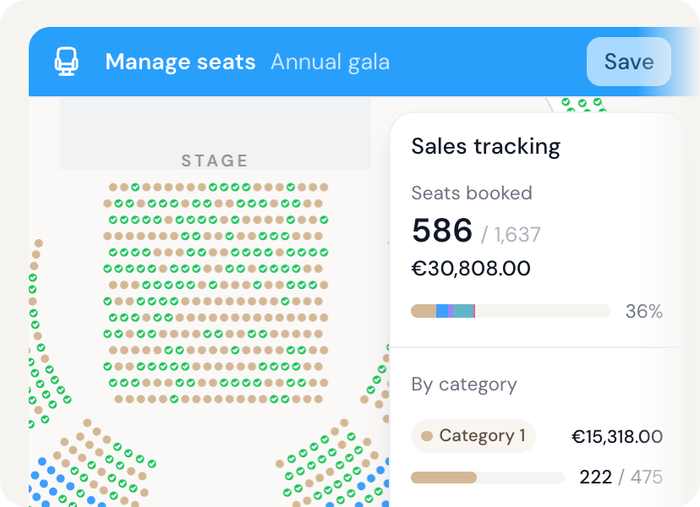
- Track how the venue is filling. See at any moment which seats have sold, section by section, and the revenue they represent.
- Take fewer phone bookings. When wheelchair spaces and companion seats can be booked online like any other seat, the people who need them no longer have to call you.
- Fill the venue better. A single seat left between two sold seats is hard to sell. Ticketing that flags this to buyers while they choose keeps those gaps to a minimum.
Features to check before choosing a tool
Not all seating plan ticketing is equal. Before choosing, check at least the following.
- The mobile experience. Try it yourself: open the plan of a large venue on your phone, pick two seats and go all the way to payment.
- Seats held during checkout. The chosen seat must be held for the buyer while they pay, otherwise two people can pay for the same seat.
- Sections and multiple prices. The same seat should be sellable at several prices (full, concession, child) without duplicating the section.
- Accessibility. Wheelchair spaces, companion seats and restricted-view seats must be marked on the plan, and buyers must be able to find them easily.
- Held seats. You should be able to take seats off sale and release them at any time.
- Mixed layouts. If your venue has a standing pit or an unreserved area, the plan should combine numbered seats and general admission.
- Help choosing. Suggesting the best available seats side by side and flagging isolated seats saves buyers time and helps you fill the venue.
- Integration with the rest of your ticketing. Confirmation emails, PDF and Wallet tickets, QR code scanning at the door, embedding on your website: the seating plan should work with all of these, not alongside them.
See the PassPass seating plan in action
Choose your seats as your audience would, on desktop or mobile, all the way to payment.
Explore the seating planHow set-up works
Setting up a seating plan follows a few steps: gather the venue’s existing plan, define sections and prices, identify special seats, decide which seats to hold, then check the plan before sales open. We go through them one by one in our guide on how to set up a seating plan.
Drawing the venue is only part of the job. The decisions matter just as much: how many sections, which prices, which seats to keep for guests. It is best to settle them before the venue is recreated.
Seating plans at PassPass
PassPass includes an interactive seating plan in its ticketing. Our engine is developed in-house: it stays fast on phones and computers alike, even in large venues, making it one of the most fluid and modern seating plans on the market. In practice:
- our team recreates your venue from your existing plan or your instructions, then you review it: theatres with balconies, multi-purpose halls, big tops, galas with tables, concerts with a standing pit and tiered seating;
- each section has its own colour and prices, and one plan can combine numbered seats and general admission;
- wheelchair spaces, companion seats and restricted-view seats are marked, and buyers can choose to show accessible seats only;
- the ticket shop suggests the best seats side by side and flags isolated seats;
- five plan styles are available (classic, advanced, illustrated, detailed, light 3D) and can be switched at any time without affecting seats or sales;
- the plan runs inside the regular checkout: add-ons, automatic emails, PDF and Apple or Google Wallet tickets, QR code scanning at the door. It can be embedded on your website and is available under white label.
PassPass ticketing costs 2% + €0.60 incl. VAT per ticket sold, with no subscription, and is free for free tickets (see pricing). The seating plan is an add-on, set up with our team, who will walk you through the terms in a first conversation. For theatre and stage productions, see also our page on show ticketing.
Frequently asked questions about reserved seating
It is a seat allocated to a specific ticket, identified by a section, a row and a number. The attendee knows where they will sit before the event and does not need to arrive early to get a good seat.
Yes, as long as the plan is designed for mobile. With PassPass, the plan opens full screen on a phone, every seat is easy to tap and the basket stays visible all the way to payment.
Yes. A single plan can combine numbered sections and general admission areas, for example numbered tiers and a standing pit for a concert.
The seat must be held for the buyer while they complete their order. With PassPass, it is held as soon as they move on to their details, so no one else can buy it in the meantime.
Ticketing costs 2% + €0.60 incl. VAT per ticket sold, with no subscription. The seating plan is an add-on set up with our team: get in touch to discuss it.
A seating plan for your next event?
Our team recreates your venue from your existing plan and sets it up with you.
Talk to our team